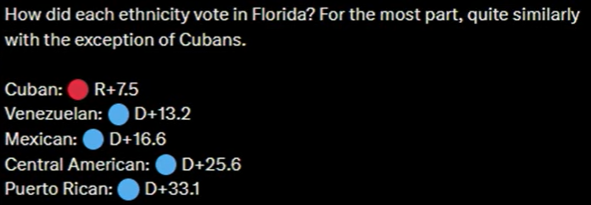
Do you all remember the 2024 Civil War movie? In that movie, the joint California and Texas secessionist “Western Forces” (WF) were called unrealistic because, it was said at the time, there was no way California and Texas would be on the same team in a future Civil War.
Watch this. The guy is accused by the cop of DUI, even though he blew a 0.0. He passed the sobriety checks. The cop tells him that he could take him to jail for DUI if he doesn’t cooperate. The man replies, “Do it and you will get sued.” The cop laughs and says, “That’s qualified immunity.” The cop then gets to court, and when the judge asks what the cop saw that constituted cause for arrest, the cop replied that the man was nervous and uncooperative.
For decades, the Republicans have told us they were on our side. Just vote R, they say, and they will fight against the Democrats and their gun control agenda. So we did. Time after time, the Republicans would promise to fight for gun rights, then cave when it mattered.
Then along came Trump. Many on the right said he wasn’t a real Republican and shouldn’t be permitted to run. It wasn’t that long ago- all of you reading this blog should remember how the “Never Trump” movement began on the right. I got into more than a couple of disagreements with people like Larry Correia, who all claimed I was wrong. It turns out we were both right. Trump was at his best when he didn’t govern like a typical politician or Republican. He is the reason why we got all of the movement on gun control we have gotten in the past decade. He grabbed the support of the largest demographic in the nation: non-Hispanic white men. Even when talking about deporting illegals, he was gaining large numbers of Hispanic voters.
I would argue that the people who put Conservatives in office are primarily white men. Sure, numbers of other demographic subgroups can be siphoned off, but the base for Conservatives is and always has been, white men.
Once that wooing of the base was done, he was poised to make some real change. Then the Republicans did whatever they could to undermine him. No SAVE act, no investigations, none of the support they could have given him to advance his agenda. They did what they have always done, and turned their backs on the people who put them in office. Those same supporters got screwed during the 2020 election.
They waited four years, gave the Republicans power over both houses of Congress, put Trump in the White House, and got screwed again. No audit of Fort Knox, DOGE collapsed and failed, reams of evidence showing endless government fraud, and no – zero – investigations. I’ve expressed that opinion here.
On top of that, Trump stuck his nutsack in an anthill with Iran, and the cost of fuel skyrocketed. Yes, I do think there was likely some degree of election tampering on Iran’s part in extending the war, and I do think it’s possible that Democrats were colluding to help that along, but the major issue was the absolute lack of any direction or action on the part of the Republicans who refused to back his policies.
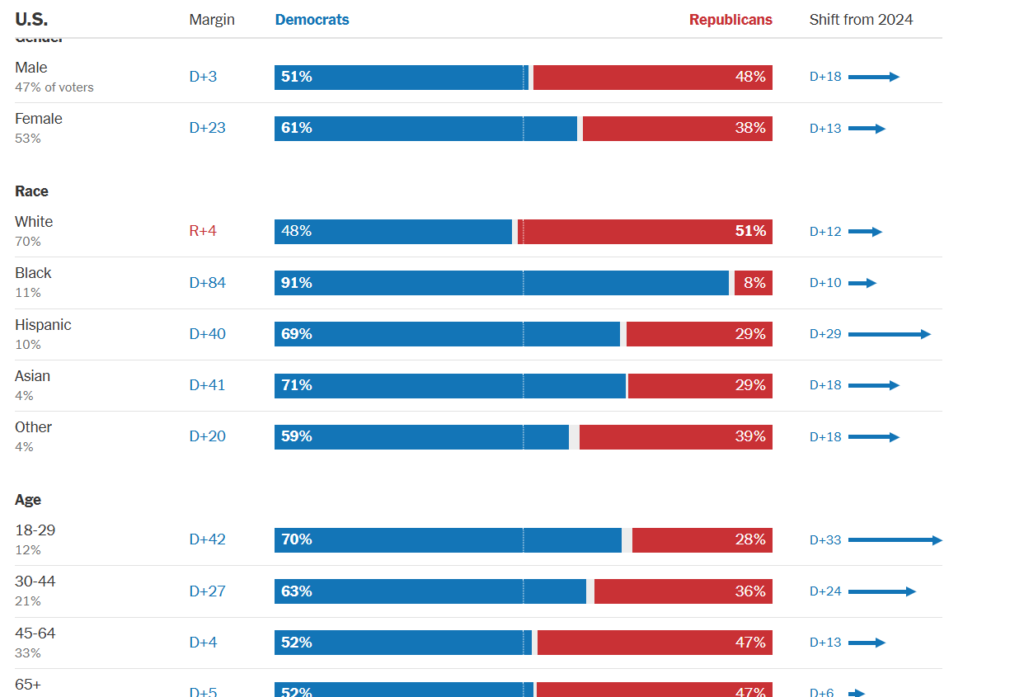
After two years of that, those voting demographics are PISSED. So they withdrew by either voting D or not voting at all. Taking a look at demographics and how they voted:
Sixty-one percent of those 18-29 voted for Republicans in 2024. In 2026, that had dropped to twenty-eight percent. Whites went from Republican 63% to only 51%. In fact, every single demographic shifted towards Democrats. Look at the above- the bloodbath was every bit as bad as I said it would be.
At the bottom of this post is a great video that explains what happened.
Now I am not saying there was no voter fraud, but Republicans blaming what happened in this election on cheating or voter fraud are doomed to keep doing what they have always done, and that attitude may well have cost them not only the election, but may have finished off the entire nation.
Where we go from here will be the subject of a future post.
I have always felt that the people who believed in a conspiracy installing a one world government were a bit, well, nuts.
Recent events are having me concede that there may be some truth to it. While still far-fetched, Canada applying to be part of the EU, the UK no longer being part of it, and now King Charles announcing that the UK is going to release its hold on its territories upon request is something I wouldn’t have thought possible either, yet here we are.
🚨 BREAKING: Incoming House Judiciary Chair Jamie Raskin promised in an interview that UNIVERSAL GUN REGISTRATION would be one of the Democrats’ top priorities in the upcoming Congress.
It’s barely been 36 hours. They aren’t waiting. They’re coming after your guns. pic.twitter.com/W8N9iERM6n
— National Association for Gun Rights (@gunrights) November 5, 2026
Now that midterms are over, Republicans are back to doing what they always do: kissing Democrat ass in the hopes of gaining political favor with anyone they believe will further their careers. The MAGA movement is imploding.
For decades, we have been teaching our children how violence doesn’t solve anything. Corporate HR looks the other way when employees are attacked by customers. An employee defending themselves from physical attack are deemed violent and terminated.
I was terminated once, suspended pending investigation several times, and other disciplinary measures because I defended myself from an attack. My attackers have never gotten more than a couple of months of probation. That’s how we have gotten to this point:
BREAKING: Stephen Redic, 70, arrested after assauIting a TPUSA member manning a booth in NH
Redic is charged with misdemeanor simple assauIt and disorderly conduct
This is political violence intended to affect voting- the definition of terrorism. Nothing is done. Simple assault charges are nothing. A fine, maybe probation.
There need to be real consequences for attacking others, but we have been conditioned to be a “good person” by not responding, because people say violence isn’t the answer.
If violence was used as the answer, wannabe bullies would stop asking the question.
Start stomping an attacker’s ass, and this sort of thing would stop happening.
It took days to count votes in 2020. We didnt know election results for 2024 until the next morning. In 2026, how were election results in within 2 hours of the polls closing?